Digital Life & Online Safety resources
Plain-English explanations, worked math, and what it means for you.
You can start with the basics.
Learn the words, follow the numbers, and understand what a choice could mean for your life. Start with the first action. Open examples and explanations when you need them, then continue in the related tool.
Your first useful action
Choose one important account and verify its recovery options through the genuine service. Organize where your recovery information is stored securely.
A worked example
A record can say: email account, recovery email checked, backup method configured, and the secure place where recovery codes are kept. Do not put actual passwords or codes here.
What people often mix up
A familiar logo or display name does not verify a sender. Account recovery codes and normal passwords have different purposes.
What to ask when you are stuck
“Can I reach the service directly through its official app or address and check this request there?”
Ask the organization or person responsible for the decision. Write down the answer, date, and any next action. If their answer uses an unfamiliar word, find it in Words explained below.
How to know this first action is finished
You can explain how to regain access and have verified the recovery contact without exposing sensitive details.
Test recovery without sharing credentials
- Open the genuine account settings and identify the configured verification and recovery methods.
- Check that recovery contacts are accessible and store backup information securely.
- Record only the method and storage location in your planner, not passwords or recovery codes.
Check your result: You know the official recovery route and can reach the required contact or secure backup.
If something changes
When a phone number or device changes, check the recovery method before losing access to the old one.
Practical how-to guides
Start with one useful skill. Clear instructions and a checklist help you through it.
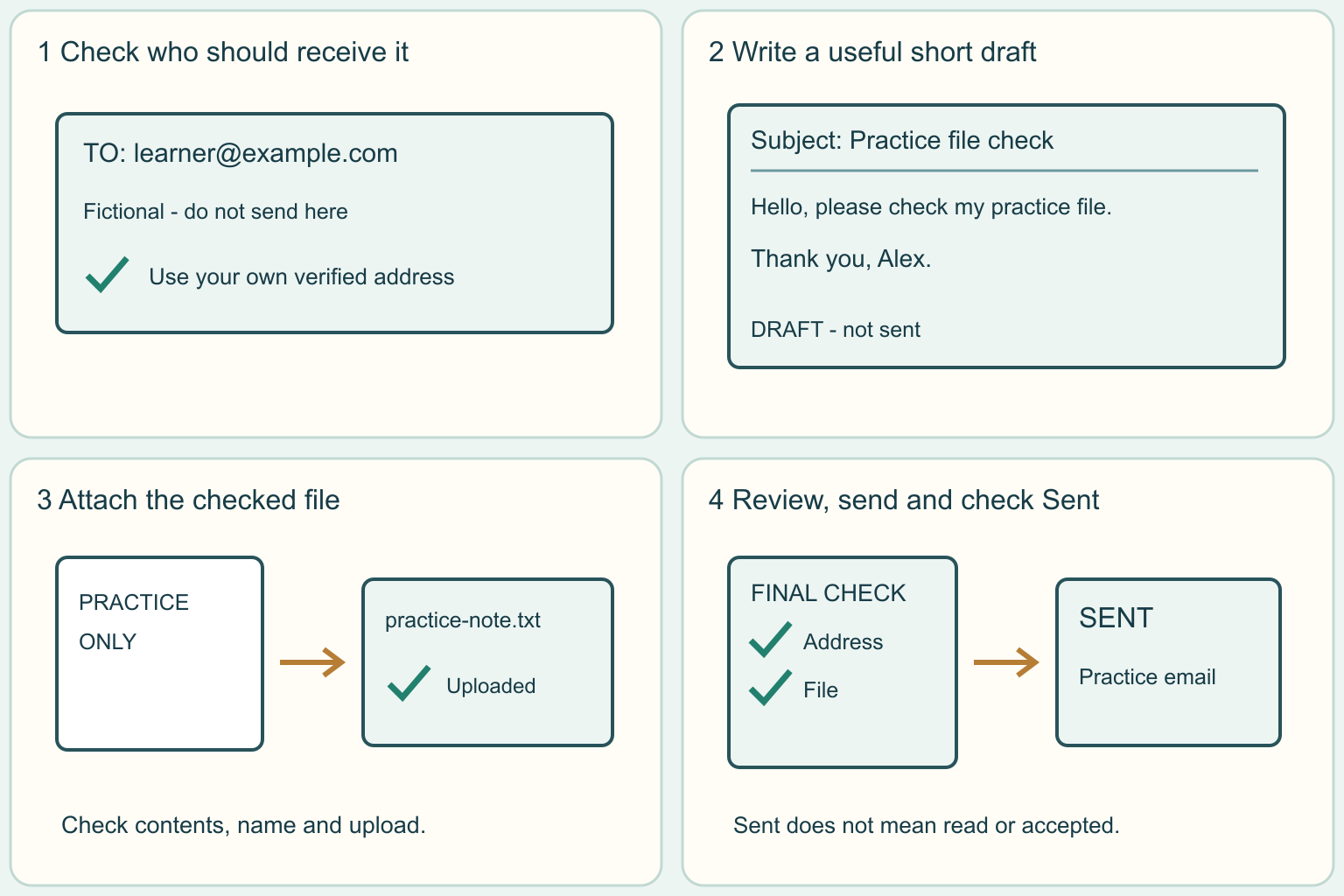
Write a clear email and attach the right file
Practice one short message, check the recipient and attachment, and learn how to confirm it left your drafts.
4 clear steps · checklist & download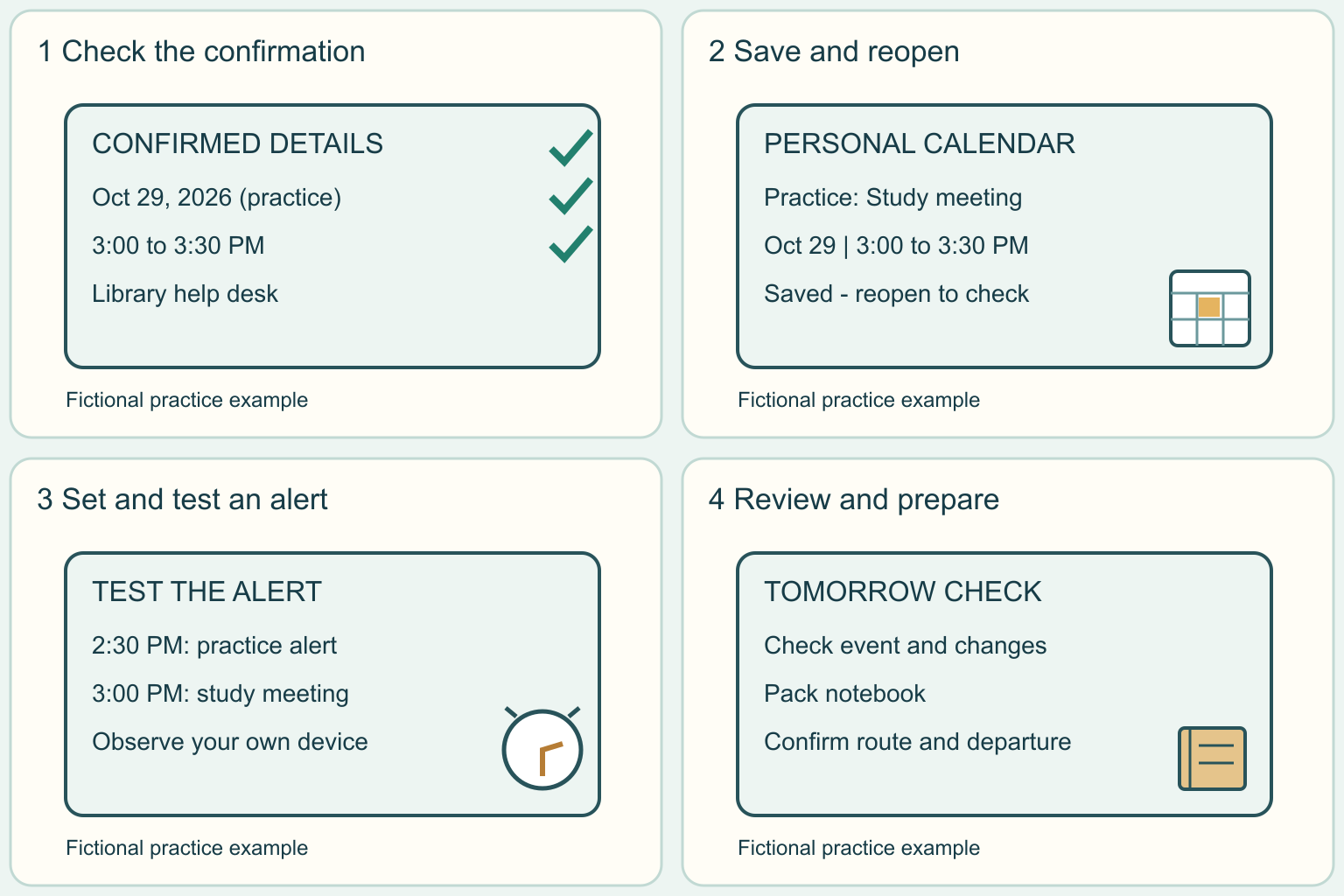
Put one appointment on your calendar and test an alert
Add one confirmed event, save a reminder, and practice finding it again. You can start with a harmless practice event.
4 clear steps · checklist & download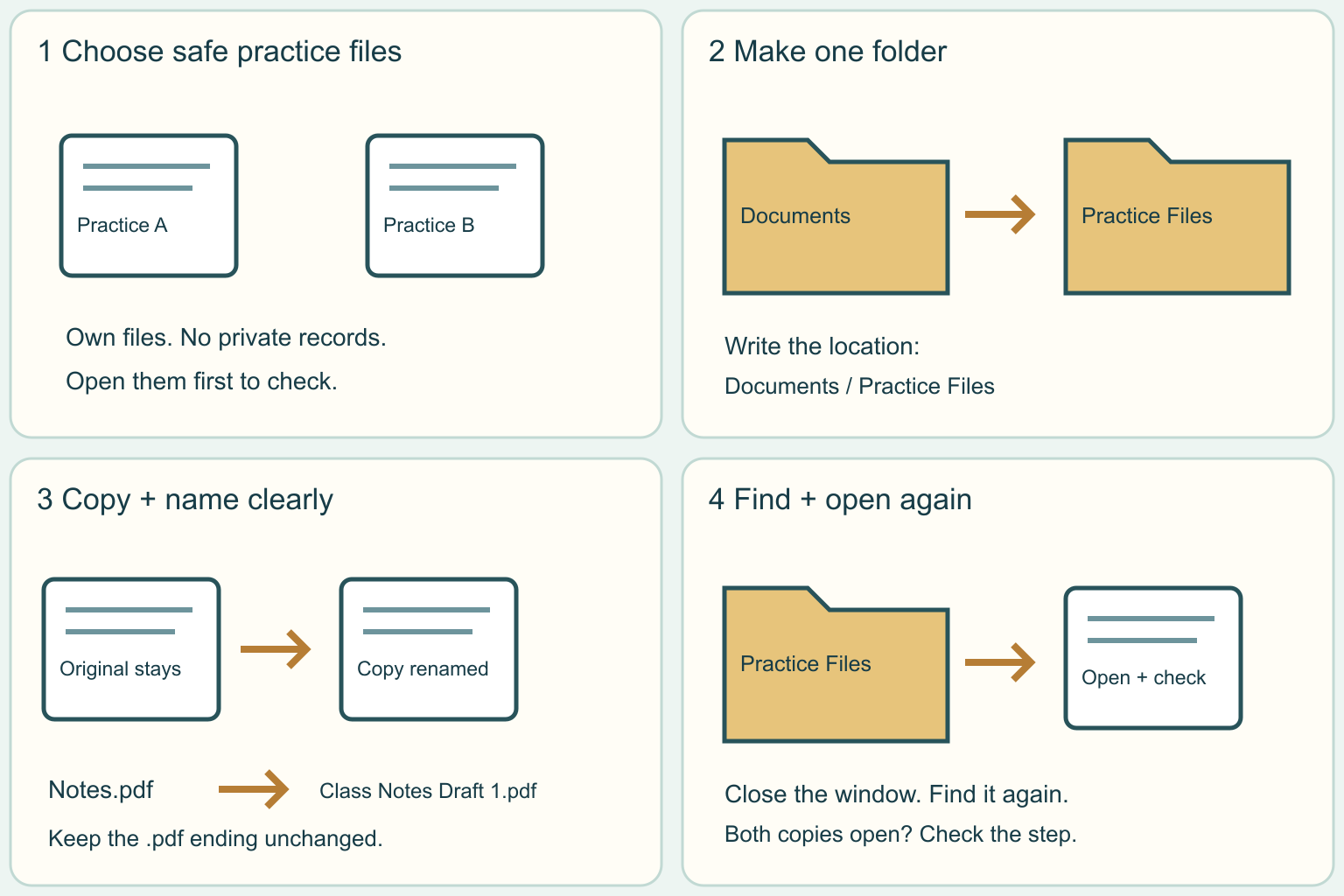
Put computer files in a folder and find them again
Practice with two harmless files. Make a folder, use clear names, and check that you can find and open your copies.
4 clear steps · checklist & download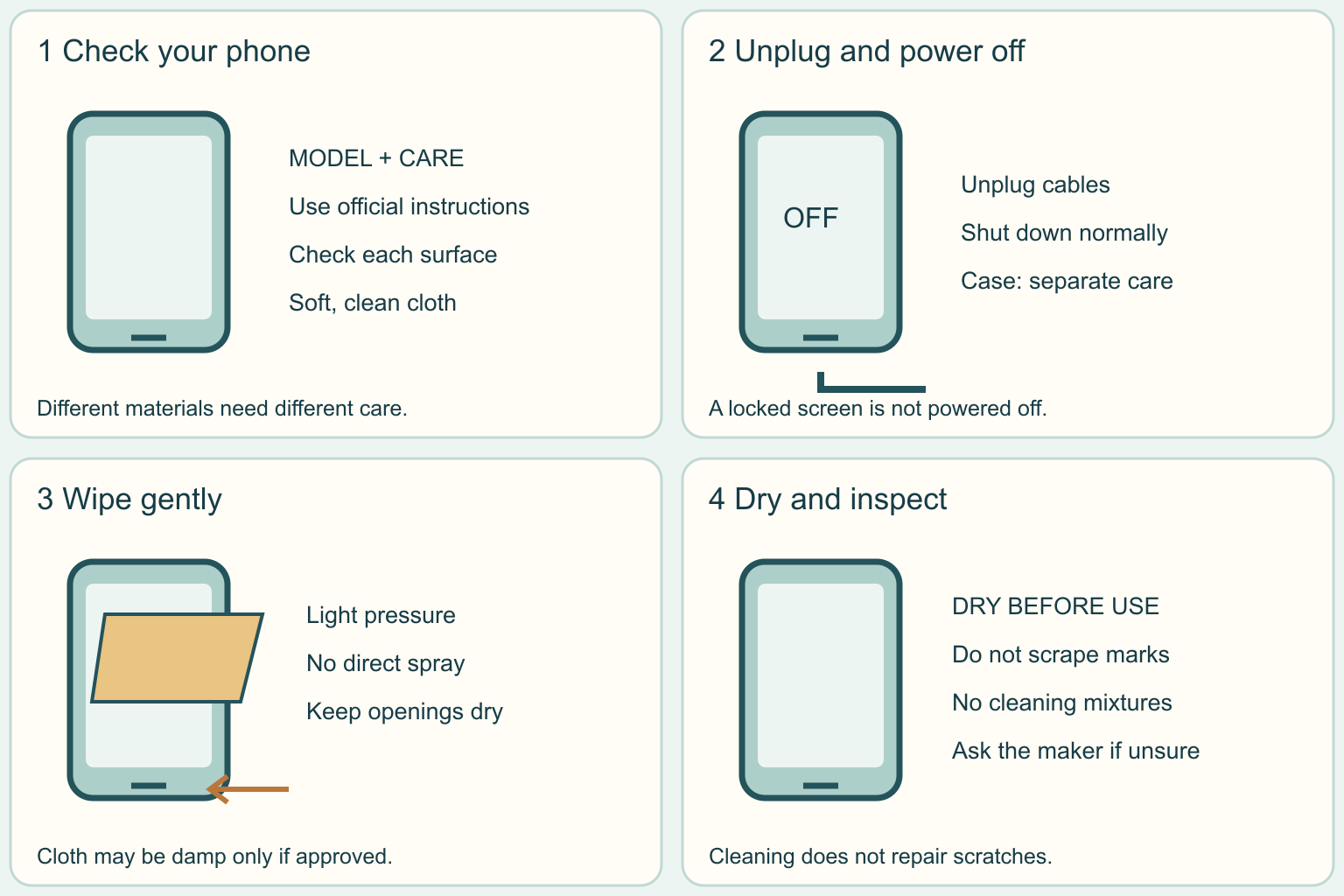
Gently clean your phone's screen and outside
Remove everyday fingerprints with a soft cloth. Learn where liquids do not belong and how to find the right instructions for your phone.
4 clear steps · checklist & downloadWhat to bring
Prepare access and recovery before changing an account or device.
Prepare the items that apply to your task. For an appointment or application, confirm the receiving organization’s exact requirements. “Ready” means you have reviewed and prepared the item.
A trusted device and genuine account access
Why you may need it
Allows you to change the intended settings.
Where to get it
Your own device and the provider’s official app or website.
Check before you go
Keep a working session available during setup.
A protected recovery location
Why you may need it
Keeps a device loss from also destroying every recovery method.
Where to get it
A suitable secure location separate from the phone being protected.
Check before you go
Never store actual passwords or recovery codes in these notes.
Backup instructions and a harmless sample file
Why you may need it
Lets you verify the recovery process without overwriting important work.
Where to get it
Your backup provider’s official instructions.
Check before you go
Restore into a separate folder and open the sample.
0 of 3 reviewed and prepared. These ticks save in this browser only.
A question you can read aloud
“How will I regain access if this device is lost?”
Keep actual documents in a secure place. Do not put Social Security numbers, full account or ID numbers, passwords, or document images into My Vault notes.
Words, in plain English
17 terms in Digital Life · Open any word to learn more.
Account sessionA currently authorized sign-in on a device or browser.
How it works
Review active sessions and revoke old or unfamiliar access using official controls.
A small example
Signing out a lost tablet ends its listed session where the service supports that action.
Start here, one step at a time
- Open the genuine service or device settings for this task.
- Review active sessions and revoke old or unfamiliar access using official controls.
- Which devices should still have access?
Try explaining this word yourself
Before looking back, explain “Account session” in your own words. Which part of the example shows it?
Then compare your explanation with “A currently authorized sign-in on a device or browser.” and the example above. If it is still unclear, use the question below with the relevant office or provider.
A question you can ask
“Which devices should still have access?”
CISA: Secure Our World (opens a new tab)App permissionAuthorization for software to access a device feature or data.
How it works
Review whether access to location, contacts, camera, or microphone fits the task.
A small example
A navigation app may need location while a simple calculator usually does not.
Start here, one step at a time
- Open the genuine service or device settings for this task.
- Review whether access to location, contacts, camera, or microphone fits the task.
- Does this permission need to be always allowed?
Try explaining this word yourself
Before looking back, explain “App permission” in your own words. Which part of the example shows it?
Then compare your explanation with “Authorization for software to access a device feature or data.” and the example above. If it is still unclear, use the question below with the relevant office or provider.
A question you can ask
“Does this permission need to be always allowed?”
CISA: Secure Our World (opens a new tab)Authenticator appAn app that produces codes or approvals for supported accounts.
How it works
Set up the account deliberately and protect the device and recovery route.
A small example
A time-based code changes periodically and must be entered on the genuine service.
Start here, one step at a time
- Open the genuine service or device settings for this task.
- Set up the account deliberately and protect the device and recovery route.
- What is the recovery process if my phone is lost?
Try explaining this word yourself
Before looking back, explain “Authenticator app” in your own words. Which part of the example shows it?
Then compare your explanation with “An app that produces codes or approvals for supported accounts.” and the example above. If it is still unclear, use the question below with the relevant office or provider.
A question you can ask
“What is the recovery process if my phone is lost?”
CISA: Secure Our World (opens a new tab)BackupA recoverable copy of data made for loss or damage.
How it works
Keep it protected and test that it can restore the files you need.
A small example
An independent copy lets you restore a document after a drive fails.
Start here, one step at a time
- Open the genuine service or device settings for this task.
- Keep it protected and test that it can restore the files you need.
- When was the last successful restore test?
Try explaining this word yourself
Before looking back, explain “Backup” in your own words. Which part of the example shows it?
Then compare your explanation with “A recoverable copy of data made for loss or damage.” and the example above. If it is still unclear, use the question below with the relevant office or provider.
A question you can ask
“When was the last successful restore test?”
CISA: Secure Our World (opens a new tab)Device encryptionProtection that makes stored data unreadable without the needed key.
How it works
Use supported device settings and secure any recovery key.
A small example
A locked encrypted drive is different from a folder merely hidden from view.
Start here, one step at a time
- Open the genuine service or device settings for this task.
- Use supported device settings and secure any recovery key.
- Where is my recovery key stored securely?
Try explaining this word yourself
Before looking back, explain “Device encryption” in your own words. Which part of the example shows it?
Then compare your explanation with “Protection that makes stored data unreadable without the needed key.” and the example above. If it is still unclear, use the question below with the relevant office or provider.
A question you can ask
“Where is my recovery key stored securely?”
CISA: Secure Our World (opens a new tab)Domain nameThe website name within a web address.
How it works
Read the actual destination carefully; a familiar logo or word somewhere in a URL proves little.
A small example
A message can display a bank name while linking to an unrelated domain.
Start here, one step at a time
- Open the genuine service or device settings for this task.
- Read the actual destination carefully; a familiar logo or word somewhere in a URL proves little.
- Did I reach this page through the official app or a trusted bookmark?
Try explaining this word yourself
Before looking back, explain “Domain name” in your own words. Which part of the example shows it?
Then compare your explanation with “The website name within a web address.” and the example above. If it is still unclear, use the question below with the relevant office or provider.
A question you can ask
“Did I reach this page through the official app or a trusted bookmark?”
CISA: Secure Our World (opens a new tab)End of supportThe point when a provider stops maintaining a product under its policy.
How it works
Check the maker’s policy and plan a supported alternative when necessary.
A small example
A device still turns on even though security fixes are no longer supplied.
Start here, one step at a time
- Open the genuine service or device settings for this task.
- Check the maker’s policy and plan a supported alternative when necessary.
- Is this exact version still receiving security fixes?
Try explaining this word yourself
Before looking back, explain “End of support” in your own words. Which part of the example shows it?
Then compare your explanation with “The point when a provider stops maintaining a product under its policy.” and the example above. If it is still unclear, use the question below with the relevant office or provider.
A question you can ask
“Is this exact version still receiving security fixes?”
CISA: Secure Our World (opens a new tab)File synchronizationKeeping versions of files aligned across locations.
How it works
Changes and deletions may propagate, so synchronization alone is not every kind of backup.
A small example
Deleting a synced file on a phone can remove it from another device too.
Start here, one step at a time
- Open the genuine service or device settings for this task.
- Changes and deletions may propagate, so synchronization alone is not every kind of backup.
- Does this service retain deleted files and older versions?
Try explaining this word yourself
Before looking back, explain “File synchronization” in your own words. Which part of the example shows it?
Then compare your explanation with “Keeping versions of files aligned across locations.” and the example above. If it is still unclear, use the question below with the relevant office or provider.
A question you can ask
“Does this service retain deleted files and older versions?”
CISA: Secure Our World (opens a new tab)Multifactor authenticationSign-in using more than one type of evidence.
How it works
A password plus possession of an authenticator is different from two knowledge questions.
A small example
An account requests an authenticator approval after a password.
Start here, one step at a time
- Open the genuine service or device settings for this task.
- A password plus possession of an authenticator is different from two knowledge questions.
- Which stronger methods does this service support?
Try explaining this word yourself
Before looking back, explain “Multifactor authentication” in your own words. Which part of the example shows it?
Then compare your explanation with “Sign-in using more than one type of evidence.” and the example above. If it is still unclear, use the question below with the relevant office or provider.
A question you can ask
“Which stronger methods does this service support?”
CISA: Secure Our World (opens a new tab)PasskeyA sign-in credential based on a cryptographic key pair.
How it works
The device or credential provider verifies your unlock action and signs for the service.
A small example
You unlock your device to sign in without typing a reusable password.
Start here, one step at a time
- Open the genuine service or device settings for this task.
- The device or credential provider verifies your unlock action and signs for the service.
- Is this passkey synced or tied to one device?
Try explaining this word yourself
Before looking back, explain “Passkey” in your own words. Which part of the example shows it?
Then compare your explanation with “A sign-in credential based on a cryptographic key pair.” and the example above. If it is still unclear, use the question below with the relevant office or provider.
A question you can ask
“Is this passkey synced or tied to one device?”
CISA: Secure Our World (opens a new tab)PassphraseA longer password made from a sequence of words.
How it works
Use unpredictable choices and avoid famous quotations or personal facts.
A small example
A private randomly generated word sequence is different from a song lyric.
Start here, one step at a time
- Open the genuine service or device settings for this task.
- Use unpredictable choices and avoid famous quotations or personal facts.
- Could someone guess this from my public posts?
Try explaining this word yourself
Before looking back, explain “Passphrase” in your own words. Which part of the example shows it?
Then compare your explanation with “A longer password made from a sequence of words.” and the example above. If it is still unclear, use the question below with the relevant office or provider.
A question you can ask
“Could someone guess this from my public posts?”
CISA: Secure Our World (opens a new tab)Password managerSoftware that stores credentials in a protected vault.
How it works
Understand its main password, recovery, device access, and sharing controls.
A small example
A manager generates and saves a long password you do not have to memorize.
Start here, one step at a time
- Open the genuine service or device settings for this task.
- Understand its main password, recovery, device access, and sharing controls.
- How would I recover the vault if this device failed?
Try explaining this word yourself
Before looking back, explain “Password manager” in your own words. Which part of the example shows it?
Then compare your explanation with “Software that stores credentials in a protected vault.” and the example above. If it is still unclear, use the question below with the relevant office or provider.
A question you can ask
“How would I recover the vault if this device failed?”
CISA: Secure Our World (opens a new tab)PhishingA deceptive request designed to steal information or prompt an unsafe action.
How it works
Verify unexpected requests through an independently opened service.
A small example
A fake delivery message asks for a card payment through an unfamiliar link.
Start here, one step at a time
- Open the genuine service or device settings for this task.
- Verify unexpected requests through an independently opened service.
- Can I confirm this in the real account without opening the message link?
Try explaining this word yourself
Before looking back, explain “Phishing” in your own words. Which part of the example shows it?
Then compare your explanation with “A deceptive request designed to steal information or prompt an unsafe action.” and the example above. If it is still unclear, use the question below with the relevant office or provider.
A question you can ask
“Can I confirm this in the real account without opening the message link?”
CISA: Secure Our World (opens a new tab)Recovery codeA backup secret used to regain access under a service’s rules.
How it works
Keep it protected and separate from the device whose loss it addresses.
A small example
A printed code in a secure place can help after losing an authenticator phone.
Start here, one step at a time
- Open the genuine service or device settings for this task.
- Keep it protected and separate from the device whose loss it addresses.
- Does using this code consume it?
Try explaining this word yourself
Before looking back, explain “Recovery code” in your own words. Which part of the example shows it?
Then compare your explanation with “A backup secret used to regain access under a service’s rules.” and the example above. If it is still unclear, use the question below with the relevant office or provider.
A question you can ask
“Does using this code consume it?”
CISA: Secure Our World (opens a new tab)Software updateA newer release that can fix security or functional problems.
How it works
Use the system’s update controls or official distribution route.
A small example
A phone downloads a security update and needs a restart to finish.
Start here, one step at a time
- Open the genuine service or device settings for this task.
- Use the system’s update controls or official distribution route.
- Has the installation completed or is it waiting for a restart?
Try explaining this word yourself
Before looking back, explain “Software update” in your own words. Which part of the example shows it?
Then compare your explanation with “A newer release that can fix security or functional problems.” and the example above. If it is still unclear, use the question below with the relevant office or provider.
A question you can ask
“Has the installation completed or is it waiting for a restart?”
CISA: Secure Our World (opens a new tab)Unique passwordA password used for just one account.
How it works
If another service is breached, a different password reduces reuse risk.
A small example
Email and shopping accounts use unrelated generated passwords.
Start here, one step at a time
- Open the genuine service or device settings for this task.
- If another service is breached, a different password reduces reuse risk.
- Where have I reused this password?
Try explaining this word yourself
Before looking back, explain “Unique password” in your own words. Which part of the example shows it?
Then compare your explanation with “A password used for just one account.” and the example above. If it is still unclear, use the question below with the relevant office or provider.
A question you can ask
“Where have I reused this password?”
CISA: Secure Our World (opens a new tab)Version historySaved earlier states of a file.
How it works
Retention and restore controls depend on the service and plan.
A small example
You restore the version before a paragraph was accidentally removed.
Start here, one step at a time
- Open the genuine service or device settings for this task.
- Retention and restore controls depend on the service and plan.
- How far back can I restore and what happens when the plan ends?
Try explaining this word yourself
Before looking back, explain “Version history” in your own words. Which part of the example shows it?
Then compare your explanation with “Saved earlier states of a file.” and the example above. If it is still unclear, use the question below with the relevant office or provider.
A question you can ask
“How far back can I restore and what happens when the plan ends?”
CISA: Secure Our World (opens a new tab)What this means for you
Your phone may hold both account access and the codes needed to restore it.
What can make it harder
Keeping all recovery methods on that one device creates a single point of failure.
What can help
Keep an independent, protected recovery route and test it before changing devices.
One next stepCheck recovery options for your primary email account.
Budget storage for a second copy
Suppose you need to back up 24 GB of photos and 6 GB of documents.
Add the source files
24 GB + 6 GB = 30 GB.
Add planned growth
30 GB + 10 GB expected additions = 40 GB.
Compare available space
A destination with 50 GB free has 50 − 40 = 10 GB remaining before version history and overhead.
What the answer tells youCapacity is not proof of a successful backup; verify completion and test a restore.
Go a little deeper
Open a lesson when you need the full explanation. You can return to it at any time.
Secure an account without locking yourself outAccount protection includes both keeping others out and retaining a reliable recovery path.
Choose the account that matters most
Start with the email account used to reset other accounts. Open its genuine app or website independently and check that you are signed into the correct account. Review recovery contacts and active devices before changing several settings at once.
Keep private secrets in a password manager or other appropriate protected storage. An ordinary checklist can record that recovery was prepared without containing the recovery code itself. This separation makes the checklist useful without turning it into a list of account keys.
Make one change and verify it
Replace a reused password with a unique strong one and save it securely. Test the new sign-in while an existing working session remains open. Next, add a supported passkey, security key, or authenticator method using the provider’s own instructions.
A code or approval prompt should correspond to a sign-in you initiated on the genuine service. Unexpected prompts are a reason to pause and inspect the account, not to approve repeatedly until the notification disappears.
Design recovery for an actual failure
Imagine the phone is unavailable rather than merely out of battery. Can you reach the recovery instructions and backup method from another trusted device? A screenshot saved only on the lost phone is not an independent recovery path.
Follow the provider’s rules for backup codes and recovery contacts. Keep any separate copy protected. Before replacing a phone, confirm the transfer and recovery process for authenticators and passkeys; wiping the old device first can remove access you still need.
Back up and review the surrounding devices
Apply supported security updates and check that installations complete after any required restart. Back up important files and restore a harmless sample to a separate folder. Synchronization can copy deletions, so read the recovery and version-history rules.
Finally review obsolete sessions, app permissions, and account-sharing arrangements. Remove what is no longer needed deliberately. Schedule another review after a device change or suspected compromise, using official support rather than an unsolicited caller offering remote help.
Check your understanding
- Explain the main idea of “Secure an account without locking yourself out” without looking back.
- Choose one example above and identify its assumptions or requirements.
- Write the next question you would ask about your own situation.
Official sources & next places to go
CISA: Secure Our World (opens a new tab)Useful places to start
- Secure Our World (opens a new tab)
Follow the official steps for passwords, MFA, updates, and phishing.
Ready for one small action?
Go back to your path. Each stage has instructions, questions to ask, and a checklist.
U.S. starting points · Foundation references reviewed September 17, 2026; expanded content added September 19, 2026. Examples use invented amounts unless stated otherwise. Requirements, rates, and policies vary; use the linked official sources and the terms that apply to you.
Use notes for plans and reminders. Keep passwords, account numbers, and sensitive documents in a secure storage service.