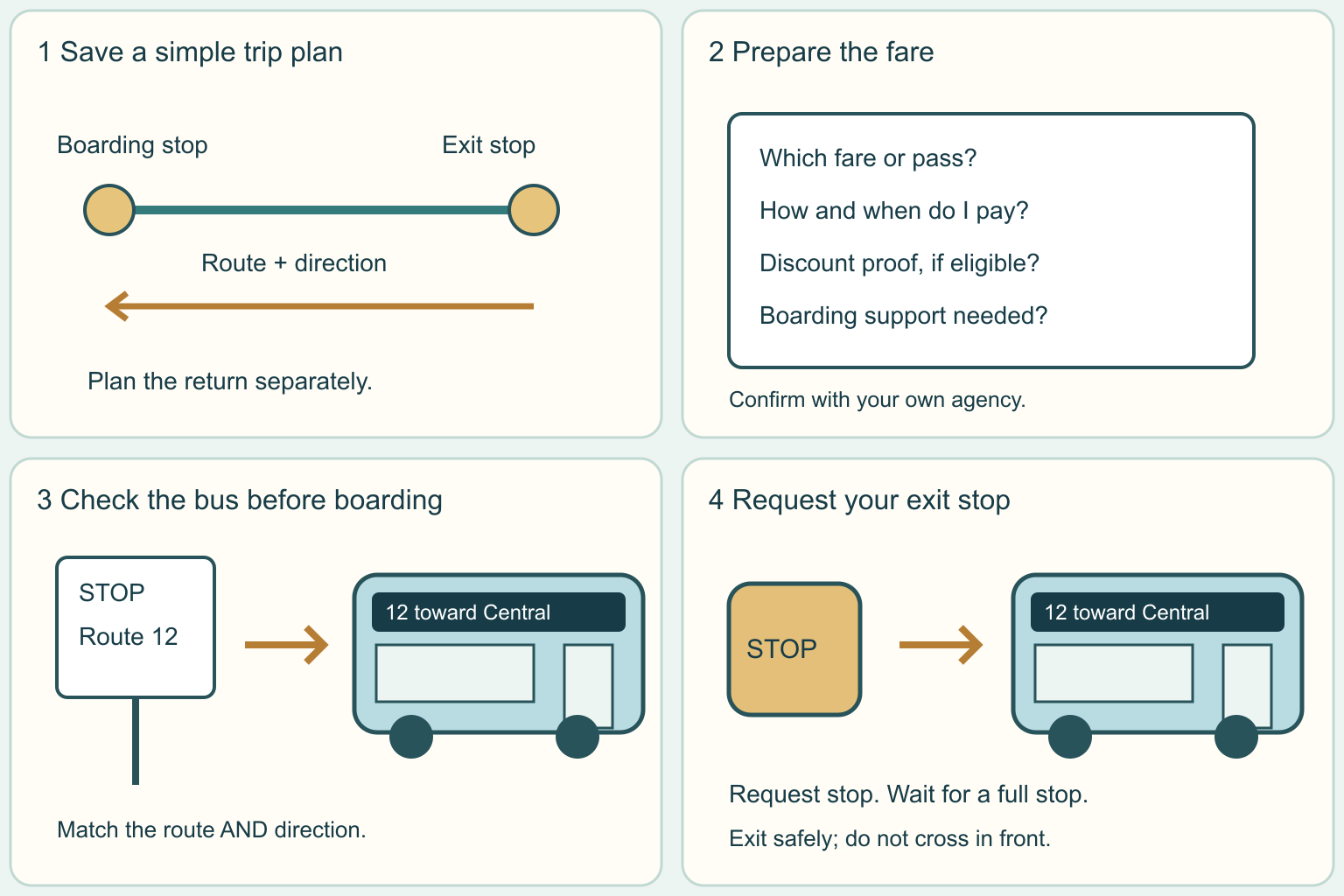
Find the right stop, check the fare, board the right bus, and get off at your planned stop.
Why it matters: Learning one simple trip can make school, work and everyday errands easier to reach.
Written guidance reviewed: 2026-10-25 · Sources and equipment assumptions are below.
Take this guide to another device
Steps, notes, supplies, setup choices, results and check dates save on this browser as you work. Plus can also keep an account copy. Account copies update only when you choose Save; loading one replaces the browser draft shown here.
Review all saved work. Saved account check dates appear in My Day. Clear the date and save again to finish a follow-up. Email settings stay separate; existing opted-in agenda or deadline emails can include these dated actions.
Understand the job before starting
Learning one simple trip can make school, work and everyday errands easier to reach.
A common mistake to avoid
A timetable is a plan, not a guarantee that a bus will arrive at the exact minute. Check live service alerts and the agency contact if a bus is late or a stop is closed. Do not board an uncertain bus just because its number looks familiar. If the trip has become confusing, stay in a safe public place and ask agency staff or a trusted person for help. Record a backup before traveling, especially when the return service ends early.
Words used in this guide
Rent
The amount paid to use someone else’s property for an agreed time. Read the example
Use what you already have. Check each item when it is ready.
Before you begin
Local routes, payment methods, boarding doors and accessibility arrangements vary. Confirm them with your own transit agency before traveling. Do not chase a moving bus, enter the road to flag it, or cross in front of a stopped bus. If you need support, plan a first practice trip with a trusted person. Keep home addresses, payment-card numbers and personal ID details out of shared worksheets.
0 of 4 steps checked0%
Guide progress and notes save on this browser; choose Save account copy above to carry them to another device with Plus. Downloads contain the complete blank checklist; print to include your current checks and notes.
Do it with me
Your step position saves on this browser. Use the picture when available, then check the written result.
STEP 1 OF 4
Plan one trip and a way back
Start here: Use your transit agency trip planner for the actual day.
Illustration: Plan one trip and a way back. Read the steps for your exact task.
Read-aloud is available in supported browsers; the written steps always remain available.
Search your town plus public transit and check the agency official website.
A route is the path a numbered or named bus follows.
In its trip planner, enter your start, destination and travel date.
Choose arrival time if you must be somewhere by a deadline.
Check the walking parts, direction and service alerts.
If you need a ramp or step-free path, ask whether both stops and the walking links are accessible.
A transfer means changing vehicles; ask staff to explain it if needed.
Save the boarding stop, route, destination direction and exit stop.
Plan the return separately; its stop may be across the street or elsewhere.
Before moving to the next step
Check this specific result: I saved the correct day, route direction, boarding stop, exit stop and return plan.
If that result is not true yet, leave the box unchecked. Write what is missing in your notes; use the official instructions below when the equipment or situation differs.
STEP 1 OF 4
Plan one trip and a way back
Start here: Use your transit agency trip planner for the actual day.
Illustration: Plan one trip and a way back. Read the steps for your exact task.
Search your town plus public transit and check the agency official website.
A route is the path a numbered or named bus follows.
In its trip planner, enter your start, destination and travel date.
Choose arrival time if you must be somewhere by a deadline.
Check the walking parts, direction and service alerts.
If you need a ramp or step-free path, ask whether both stops and the walking links are accessible.
A transfer means changing vehicles; ask staff to explain it if needed.
Save the boarding stop, route, destination direction and exit stop.
Plan the return separately; its stop may be across the street or elsewhere.
Before moving to the next step
Check this specific result: I saved the correct day, route direction, boarding stop, exit stop and return plan.
If that result is not true yet, leave the box unchecked. Write what is missing in your notes; use the official instructions below when the equipment or situation differs.
STEP 2 OF 4
Confirm the fare before leaving
Start here: Ask which payment or pass works for this exact trip.
Illustration: Confirm the fare before leaving. Read the steps for your exact task.
The fare is the price of the ride.
A pass is a ticket or account product that covers specified travel.
Read your agency current fare and payment page.
Ask whether your trip needs a special fare, how and when to pay, and whether any transfer is included.
Ask about student, youth or other reduced fares and the proof they actually require; do not assume they apply.
If using cash, confirm whether it is accepted and whether exact change is needed.
If using an app ticket, check its activation rules and have enough phone power.
Before moving to the next step
Check this specific result: I know the required fare or valid pass, the accepted payment method and any evidence to bring.
If that result is not true yet, leave the box unchecked. Write what is missing in your notes; use the official instructions below when the equipment or situation differs.
STEP 3 OF 4
Match the stop and bus before boarding
Start here: Check both the route and direction; ask before boarding if unsure.
Illustration: Match the stop and bus before boarding. Read the steps for your exact task.
Go to the confirmed stop early enough to follow the agency advice.
Read its sign or stop number and check for a closure notice.
Wait safely back from the roadway.
When the bus arrives, compare its route number or name and destination display with your plan.
The same route can run in two directions.
Let people get off and follow the agency boarding instructions.
When the bus is stopped, you can ask, Does this bus go toward my exit stop?
Follow local payment instructions and ask for boarding assistance if needed.
Keep aisles and access spaces clear.
Before moving to the next step
Check this specific result: I checked the stop, route and direction, boarded safely and followed the correct payment instructions.
If that result is not true yet, leave the box unchecked. Write what is missing in your notes; use the official instructions below when the equipment or situation differs.
STEP 4 OF 4
Request your stop and leave safely
Start here: Watch for your stop and use the agency stop-request method.
Illustration: Request your stop and leave safely. Read the steps for your exact task.
Watch or listen for upcoming stops.
Ask the driver about your exit stop while boarding if you need help identifying it.
Follow local instructions for requesting a stop, such as a cord or stop button, with enough notice.
Hold a rail if standing.
Wait for the bus to stop fully and follow the indicated exit route or assistance instructions.
After leaving, use a proper crossing where traffic is visible; do not walk in front of the bus.
If you miss the stop, stay calm and ask where it is safe to get off and replan.
Before moving to the next step
Check this specific result: I got off safely, checked the next walking part and still have a way home.
If that result is not true yet, leave the box unchecked. Write what is missing in your notes; use the official instructions below when the equipment or situation differs.
Pictures for this guide
Picture 1 of 4 · Plan one trip and a way back
A route line connects a boarding stop and an exit stop, with a separate return arrow.
For: Plan one trip and a way back
Illustrations show examples of the actions above. Follow your equipment’s instructions.
Notes about these pictures
Search your town plus public transit and check the agency official website. A route is the path a numbered or named bus follows. In its trip planner, enter your start, destination and travel date. Choose arrival time if you must be somewhere by a deadline. Check the walking parts, direction and service alerts. If you need a ramp or step-free path, ask whether both stops and the walking links are accessible. A transfer means changing vehicles; ask staff to explain it if needed. Save the boarding stop, route, destination direction and exit stop. Plan the return separately; its stop may be across the street or elsewhere.
Local routes, payment methods, boarding doors and accessibility arrangements vary. Confirm them with your own transit agency before traveling. Do not chase a moving bus, enter the road to flag it, or cross in front of a stopped bus. If you need support, plan a first practice trip with a trusted person. Keep home addresses, payment-card numbers and personal ID details out of shared worksheets.
Was this step clear?
Flag “Plan one trip and a way back” for review. We save the guide and step identifiers with your account to limit duplicates, not your private notes.
A specific companion has not been selected for this new guide yet. You can search for related demonstrations; search results have not been reviewed by Life’s Checklists.
These YouTube videos belong to their respective creators. Life’s Checklists does not own them and is not affiliated with the creators. Links open on YouTube, where the videos are available independently of our membership.
How to use the video with this guide
Read “Before you begin” first. Watch the relevant part, pause, then return to the written step and its completion check. Use captions and playback speed if they help. A demonstration may cover only part of the task or show different equipment.
Your model’s instructions and current official guidance take priority. For urgent problems, follow the stop instructions without waiting to watch a video.
Finish the job and know what to do next.
For this guide, the final result is: I got off safely, checked the next walking part and still have a way home.
A concrete way to approach this task
Fictional example: Riley plans a Saturday trip to a library. The saved plan says Route 12 toward Central, board at Oak Street and leave at Library Stop. These names and numbers are invented. Riley checks the actual agency fare rules and plans the return before leaving.
What if I cannot complete a step?
A timetable is a plan, not a guarantee that a bus will arrive at the exact minute. Check live service alerts and the agency contact if a bus is late or a stop is closed. Do not board an uncertain bus just because its number looks familiar. If the trip has become confusing, stay in a safe public place and ask agency staff or a trusted person for help. Record a backup before traveling, especially when the return service ends early.
Identify the exact step: “Plan one trip and a way back.” Record what you tried, what happened, and which item or model you used. Ask for help with that specific problem rather than repeating an unsafe or unsuccessful action.
Local routes, payment methods, boarding doors and accessibility arrangements vary. Confirm them with your own transit agency before traveling. Do not chase a moving bus, enter the road to flag it, or cross in front of a stopped bus. If you need support, plan a first practice trip with a trusted person. Keep home addresses, payment-card numbers and personal ID details out of shared worksheets.
Connect this skill to everyday life
Set a total purchase and running budget before shopping. Arrange an independent inspection and collect written terms for the specific vehicle.
A low monthly payment can come with a longer term or higher total cost. A vehicle history report is not a substitute for inspecting its current condition.
A useful record for this task: Record the result of “Request your stop and leave safely”: I got off safely, checked the next walking part and still have a way home.
When finished, record the result and any next check or follow-up date. Your original step checks and notes remain on this browser.
Keep the result of your work
Finish and check every step before recording completion. You can write a draft below now.
Result: Not recorded · Next check: Not chosen
Choose a date from your own manual or situation. No email is enabled by saving this record.