Find the product label, search the U.S. recall list and check whether an official notice covers your item.
Why it matters: The exact product details help you find the right follow-up when a safety notice applies.
Written guidance reviewed: 2026-11-14 · Sources and equipment assumptions are below.
Take this guide to another device
Steps, notes, supplies, setup choices, results and check dates save on this browser as you work. Plus can also keep an account copy. Account copies update only when you choose Save; loading one replaces the browser draft shown here.
Review all saved work. Saved account check dates appear in My Day. Clear the date and save again to finish a follow-up. Email settings stay separate; existing opted-in agenda or deadline emails can include these dated actions.
Understand the job before starting
The exact product details help you find the right follow-up when a safety notice applies.
A common mistake to avoid
If the label is unreadable, check the original box or ask the maker how to identify the item. Search the maker’s official safety notices too if the CPSC search finds nothing. Keep an unsafe item out of use even if you find no recall.
Use what you already have. Check each item when it is ready.
Before you begin
Keep private contact details and full serial numbers out of shared worksheets. Use a label you can see without opening a housing, lifting a heavy appliance or moving a damaged item. Follow the official notice for your product before attempting any repair or disposal.
0 of 4 steps checked0%
Guide progress and notes save on this browser; choose Save account copy above to carry them to another device with Plus. Downloads contain the complete blank checklist; print to include your current checks and notes.
Do it with me
Your step position saves on this browser. Use the picture when available, then check the written result.
STEP 1 OF 4
Find the brand and model number
Start here: Read the label you can reach safely.
Illustration: Find the brand and model number. Read the steps for your exact task.
Read-aloud is available in supported browsers; the written steps always remain available.
A recall is a notice about a product with a safety problem.
Find the brand and model on the item, box or manual.
A model number identifies a product version.
Some notices also use a serial number, which identifies one item, or a date code.
Use the manual to find the label if needed.
Ask the owner or maker if you cannot reach it safely.
Before moving to the next step
Check this specific result: I wrote down the brand and model and know where to look for other codes.
If that result is not true yet, leave the box unchecked. Write what is missing in your notes; use the official instructions below when the equipment or situation differs.
STEP 1 OF 4
Find the brand and model number
Start here: Read the label you can reach safely.
Illustration: Find the brand and model number. Read the steps for your exact task.
A recall is a notice about a product with a safety problem.
Find the brand and model on the item, box or manual.
A model number identifies a product version.
Some notices also use a serial number, which identifies one item, or a date code.
Use the manual to find the label if needed.
Ask the owner or maker if you cannot reach it safely.
Before moving to the next step
Check this specific result: I wrote down the brand and model and know where to look for other codes.
If that result is not true yet, leave the box unchecked. Write what is missing in your notes; use the official instructions below when the equipment or situation differs.
STEP 2 OF 4
Search the official recall list
Start here: Look up the household item on the CPSC recalls page.
Illustration: Search the official recall list. Read the steps for your exact task.
For U.S. household products, open the Consumer Product Safety Commission’s recalls page.
Search for the brand and product type.
Try the model number or a shorter brand name if the first search misses.
Open notices that look relevant.
For food, medicine or vehicles, Recalls.gov points to the agency for that kind of product.
Before moving to the next step
Check this specific result: I opened any relevant official notices or noted that my search found none.
If that result is not true yet, leave the box unchecked. Write what is missing in your notes; use the official instructions below when the equipment or situation differs.
STEP 3 OF 4
Compare the exact details
Start here: Match your product label to the notice.
Illustration: Compare the exact details. Read the steps for your exact task.
Read the description of products covered.
Compare the brand, model and any listed serial number range, date code or other required details.
A similar photo or product name is only a clue.
If a code is missing or unclear, contact the number or website listed in the official notice and ask whether your item is covered.
Before moving to the next step
Check this specific result: I marked the item as a match, outside the notice or still uncertain.
If that result is not true yet, leave the box unchecked. Write what is missing in your notes; use the official instructions below when the equipment or situation differs.
STEP 4 OF 4
Follow the instructions for your item
Start here: Read the remedy section and record the next step.
Illustration: Follow the instructions for your item. Read the steps for your exact task.
A remedy is what the notice says to do about the problem.
Follow the notice’s stop-use instructions and take the listed steps for a refund, replacement, repair or other action.
Use only the official contact for your item.
Keep a copy of your confirmation.
If you find no matching notice but the item seems damaged or unsafe, stop using it and ask the maker for help.
Before moving to the next step
Check this specific result: I recorded the notice or search result and the next action that applies.
If that result is not true yet, leave the box unchecked. Write what is missing in your notes; use the official instructions below when the equipment or situation differs.
Pictures for this guide
Picture 1 of 4 · Find the brand and model number
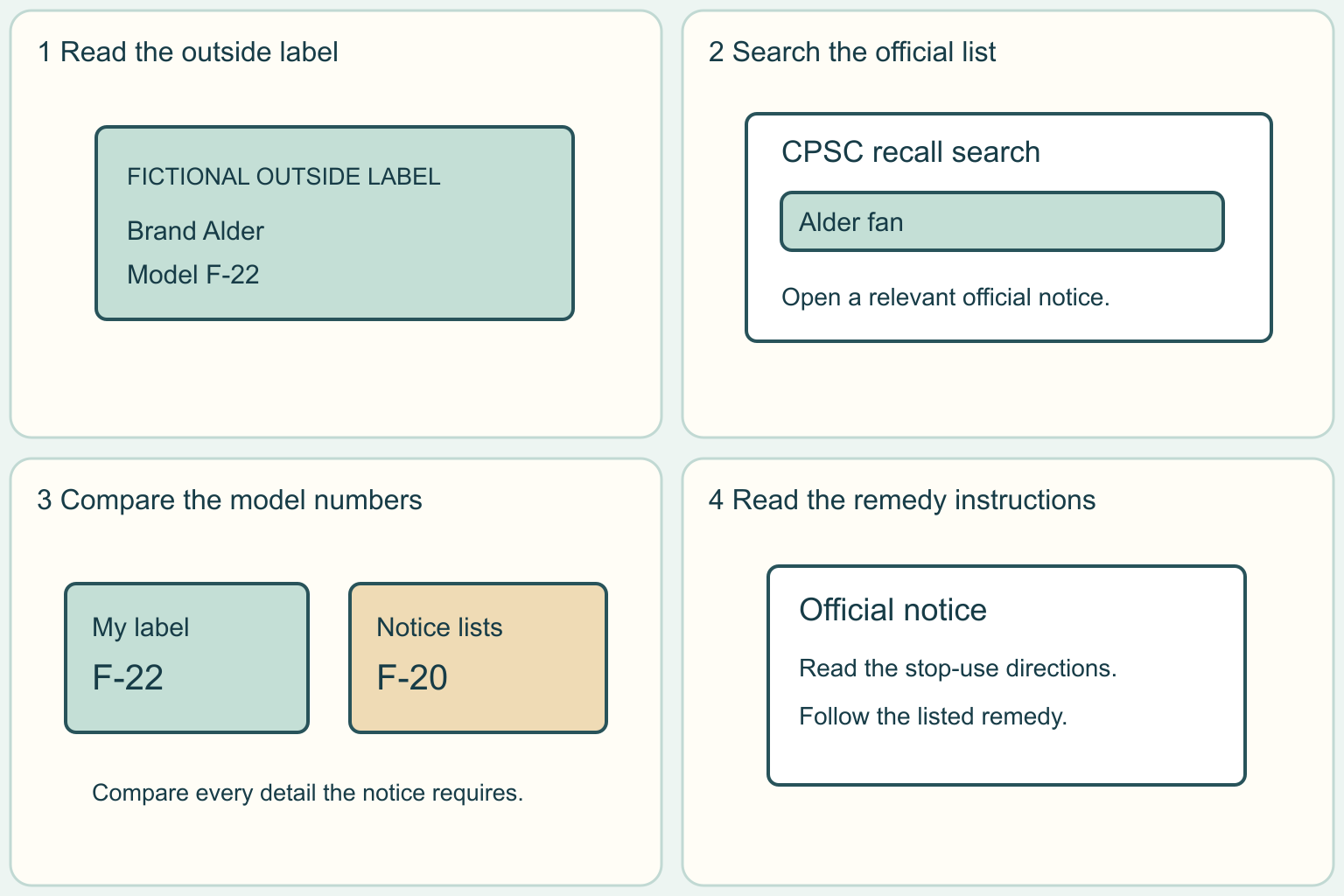
A fictional outside label identifies brand Alder and model F-22.
For: Find the brand and model number
Illustrations show examples of the actions above. Follow your equipment’s instructions.
Notes about these pictures
A recall is a notice about a product with a safety problem. Find the brand and model on the item, box or manual. A model number identifies a product version. Some notices also use a serial number, which identifies one item, or a date code. Use the manual to find the label if needed. Ask the owner or maker if you cannot reach it safely.
Keep private contact details and full serial numbers out of shared worksheets. Use a label you can see without opening a housing, lifting a heavy appliance or moving a damaged item. Follow the official notice for your product before attempting any repair or disposal.
Was this step clear?
Flag “Find the brand and model number” for review. We save the guide and step identifiers with your account to limit duplicates, not your private notes.
A specific companion has not been selected for this new guide yet. You can search for related demonstrations; search results have not been reviewed by Life’s Checklists.
These YouTube videos belong to their respective creators. Life’s Checklists does not own them and is not affiliated with the creators. Links open on YouTube, where the videos are available independently of our membership.
How to use the video with this guide
Read “Before you begin” first. Watch the relevant part, pause, then return to the written step and its completion check. Use captions and playback speed if they help. A demonstration may cover only part of the task or show different equipment.
Your model’s instructions and current official guidance take priority. For urgent problems, follow the stop instructions without waiting to watch a video.
Finish the job and know what to do next.
For this guide, the final result is: I recorded the notice or search result and the next action that applies.
A concrete way to approach this task
In this fictional example, Ana sees a notice for an Alder desk fan marked F-20. Her fan says F-22. She checks the full list of models in the notice and asks the maker if she still cannot tell whether it applies. Alder and both model numbers are invented for this exercise.
What if I cannot complete a step?
If the label is unreadable, check the original box or ask the maker how to identify the item. Search the maker’s official safety notices too if the CPSC search finds nothing. Keep an unsafe item out of use even if you find no recall.
Identify the exact step: “Find the brand and model number.” Record what you tried, what happened, and which item or model you used. Ask for help with that specific problem rather than repeating an unsafe or unsuccessful action.
Keep private contact details and full serial numbers out of shared worksheets. Use a label you can see without opening a housing, lifting a heavy appliance or moving a damaged item. Follow the official notice for your product before attempting any repair or disposal.
Connect this skill to everyday life
Collect the handover records and identify the home systems using the owner manuals. Start with one system or one unresolved handover item.
A warranty and an insurance policy cover different situations. Knowing where a shutoff is does not mean every repair is safe to do yourself.
A useful record for this task: Record the result of “Follow the instructions for your item”: I recorded the notice or search result and the next action that applies.
When finished, record the result and any next check or follow-up date. Your original step checks and notes remain on this browser.
Keep the result of your work
Finish and check every step before recording completion. You can write a draft below now.
Result: Not recorded · Next check: Not chosen
Choose a date from your own manual or situation. No email is enabled by saving this record.